Local Native v0.5.2 Browser Extension: Manifest V3 and a Rebuilt Popup

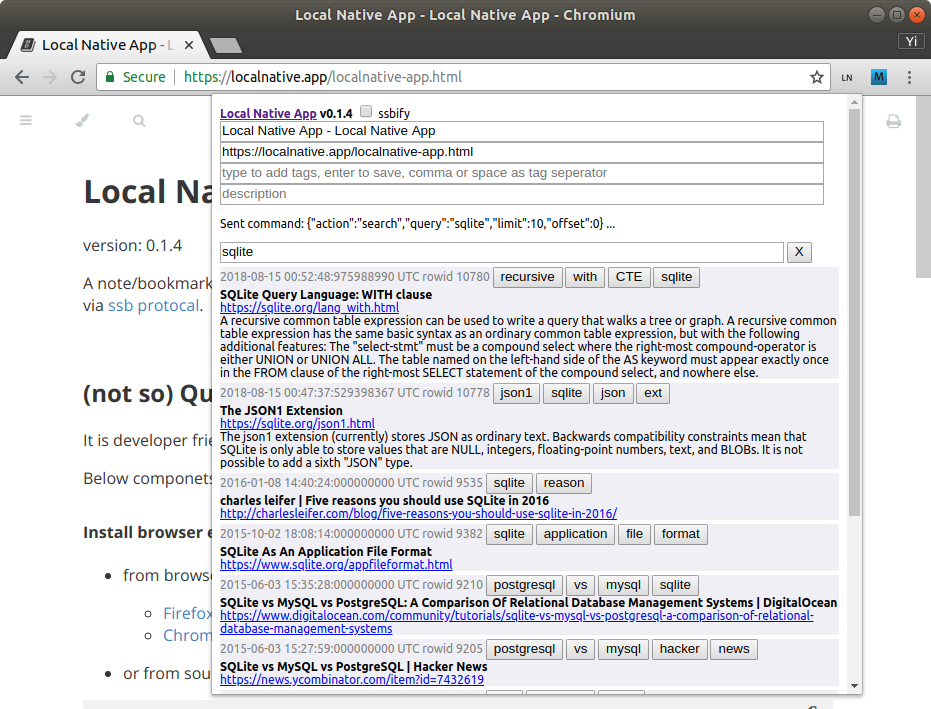
v0.5.2 of the Local Native browser extension has been submitted to the Chrome Web Store and is pending review. It is not available yet. This post is the changelog; a follow-up will note when it is live.
Why this release exists
The Chrome Extension was removed from the Chrome Web Store under the Manifest V2 deprecation, which took effect on 31 August 2026.
The awkward part: the manifest had said manifest_version: 3 since November 2022.
What never happened was migrating the code underneath it. The very first line of
the popup's DOMContentLoaded handler called chrome.tabs.executeScript, which
does not exist in MV3. It threw, and every handler registered after it never ran —
title and URL autofill, search, pagination, the theme toggle, save-on-Enter. The
extension had been broken in a way the manifest alone did not reveal.
So v0.5.2 is two things at once: an actual MV3 migration, and the repairs that became visible once the popup started running again.
Manifest V3, properly this time
tabs.executeScriptplus message passing is replaced withscripting.executeScript, injected on demand only when Save content is ticked. It used to fire on every popup open, racing fast saves.applicationsbecomesbrowser_specific_settings, which MV3 requires.- Preferences moved from
localStoragetochrome.storage.local, so your theme and language survive clearing browsing data.
The permission set got smaller. MV3 needs scripting and storage, but
tabs is gone — activeTab already covers reading the current tab's URL and
title when you invoke the extension. Together with a Content Security Policy of
connect-src 'none' and no host permissions at all, the extension cannot open a
network connection to anywhere. The only thing it talks to is the Local Native
desktop app on your own machine, over native messaging.
A popup that shows your notes
Chrome caps extension popups at 600px tall. The old layout spent about 330px of that — more than half — before a single note appeared, and each note cost another 132px. In practice you saw roughly one and a half notes, and scrolling for more carried the search box off the top of the window.
The list is now the part that scrolls, so the search box and pagination stay put. Notes went from four stacked blocks in a bordered card to two compact lines, and the input area tightened up: Title and URL share a row, since both are filled in from the page for you.
The result is about six notes visible instead of one and a half, in the same space.
Descriptions keep their own full-width line, but only when there is one to show — in a real database of 13,441 notes, 12,091 have no description, so the extra line is paid on roughly a tenth of notes.
Errors that mean something
Every failure used to render the same sentence: running or failed :-( run desktop app to finish setup browser extension! — shown, in fact, before the request had
even been answered. Whether the desktop app was missing, the native messaging host
was not registered, or the extension simply was not permitted to talk to it, you
got that one line.
The popup now reports what actually went wrong, and only when something did. That
distinction turned out to matter more than expected. localnative-web-ext-host
is one-shot: it reads a single message, replies, and exits. Chrome therefore
reports "Native host has exited." after every command, including successful
ones. A naive fix would have shown an error after every save you made. The popup
now tracks whether a reply arrived before the disconnect, and stays quiet when it
did.
Real failures appear as a dismissable toast instead of a permanent row, so an error no longer pushes the note list around. The raw protocol JSON that used to sit above the search box is gone — the note count was already in the pagination indicator, and the rest was only ever useful in DevTools, which is where it now goes.
Smaller things
- Dark mode: the search box and language selector set a themed background but no text colour, so they inherited black — 1.44:1 against the dark background, and effectively unreadable. Now 13.35:1.
- The Save content checkbox was internally called
ssbify, named for a Secure Scuttlebutt integration removed from the core back in schema 0.5.0. It is nowsave-content. Your existing setting is migrated, not reset. - The SSB Sync button is gone. It sent a command the core stopped understanding several schema versions ago, and it had been hidden from view anyway.
- The version in the popup header reads
ext v0.5.2, and is read from the manifest rather than hardcoded in markup, where it had drifted.
On version numbers
That last item deserves a note, because it is why this release exists at all in its current shape.
Local Native platforms now version independently, and this is written down in
docs/VERSIONING.md. The only version shared across platforms is the database
schema version, which is what actually gates peer sync — an Android phone and a
Chrome extension sync correctly regardless of their release numbers.
Previously a single script wrote one version number into the Rust crates, the extension manifest, and the popup markup together. Nobody wanted to bump the crates — published to crates.io, where versions cannot go backwards — merely to ship an extension. So the extension sat at 0.5.1 from 2022 until the Web Store removed it. The Manifest V3 work had landed; only the version number had not.
Coupling the versions did not keep anything in sync. It stopped releases from happening.
v0.5.2 is pending review on the Chrome Web Store. The Firefox Addon release will follow. As always, the extension needs the desktop app running to store anything — the notes live in SQLite on your machine, and nothing goes anywhere else.